Showing posts with label exchange. Show all posts

2021/11/07

How to set up a CardDAV and CalDAV server on Windows 10/11

How to set up a carddav server on Windows 10/11?

In this year of 2020, more and more jobs require people to work from home due to COVID-19 pandamic. Syncing calendar, contact and task remotely from home in order to cope with colleagues has become an issue for those who have not done this before.

Many people want to host their own address book server for various reasons, for example, higher security, there are several address book (CardDAV) servers and calendar (CalDAV) server software programs are lying around, such as OwnCloud for Linux and Mac OS X server for Apple computers and etc. However, what is our choice if we want to setup one on Windows PC? Among all paid or free mail server software, I recommend one that takes a breeze to install: EVO Mail Server.

How to set up a caldav server on Windows Server?

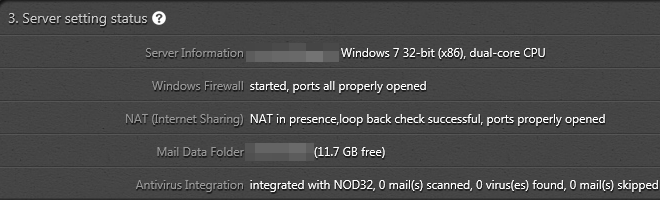
There are only a few steps before you can get the CardDAV/CalDAV server up and running: 1. Open port of 8008, 8443 (for SSL), and 8843 (for SSL) in network firewall or router If such a device does exist and you want it accessible across Internet. 2. Download EVO Mail Server from EVO Official Site and Install it. 3. At the Server setting status of Status page of EVO Mail Server, click on the looping circular arrows to the right-hand side of Windows Firewall to open CardDAV/CalDAV ports in Step 1.
1-3_computer_structure

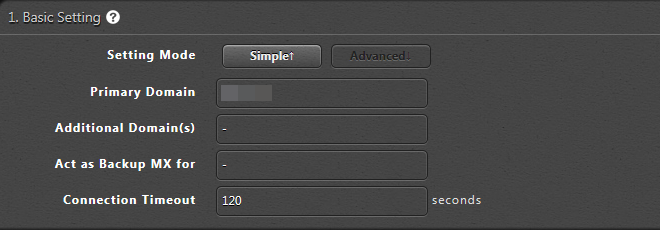
4. Enter domain name in Primary domain within Settings page of EVO Mail Server GUI, if you own an Internet domain name and want EVO to generate proper SSL certificate for that. Otherwise, your server internal IP or public IP can do it.

advanced_mode_1_basic

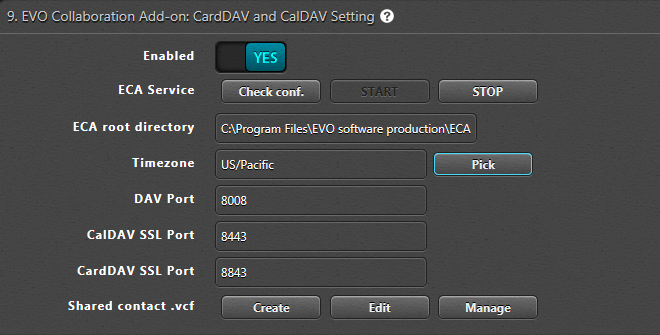
5. On the same Settings page, go to 9. EVO Collaboration Add-on: CardDAV and CalDAV Setting and click Enabled to YES.

eca_screenshot

6. Click Check conf. to the right of ECA Service and click on START to start the service. Then, a window will pop up informing you that the service is running. Note: you may be prompted to download MS VC++ 2008 runtime and ECA (EVO Collaboration Add-on) in this step. 7. Final step, sign your certificate with certificate authorities such as k-software or comodo, that will help clients to negotiate with server without a warning. Now, you may use any CardDAV/CalDAV synchronizer enabled clients such as EVO Collaborator for Outlook, iPhone/iPad devices, Apple iCal, Thunderbird’s Lightning add-on, and etc to access CardDAV/CalDAV resources.

2014/05/19

How to share my Outlook calendar with another user?

Share Outlook calendars with others

Someone has recently asked me about “how can he share his Outlook calendars with others?” Of course, you can do it!

Originally, Outlook users can only share their calendars with others if Outlook connects to

an Exchange Server through Microsoft’s proprietary protocol, MAPI. What if you don’t have an Exchange Server running on the backend? Sorry, it is a “no can do” situation.


However, with EVO Collaboration for Outlook, you no longer feel helpless when your boss wants to check your calendars or tasks.

Why share Outlook calendar with other user?


It is impossible to share your calendars and tasks with others in absence of Exchange Server. All Outlook can do is a stand-alone personal organizer on the calendar part.

However, situations do occur from time to time that:

  1. Manager relies on his or her secretary for schedule arrangements.
  2. Manager needs to watch over his colleagues’ progress on certain projects.
  3. You may need to share your schedules with your backup so he knows how to follow up while you are on leaves.

What do you need to share your Outlook calendars and tasks without Microsoft Exchange Server?

You need the following:

  1. Registering a CalDAV account such as iCloud or fruux is not a bad choice or you can host your own CalDAV service, EVO Mail Server for example.

    One thing good about building your own CalDAV service using EVO Mail Server is that you can give viewers a read-only password so that they will not mess around with your calendars.
  2. EVO Collaborator for Outlook 2007, 2010, 2013, 2016, 2019 add-in, which enables you to perform a two-way synchronization for both calendar and task items between your CalDAV services and Outlook.

How do you share your Outlook calendar without Exchange?

Before you share your calendar and task, you must:

  1. Have username and password of the CalDAV account you previously prepared ready.
  2. Download ECO from EVO's Official Site and install it on viewers’ computer at least in case you add items from elsewhere other than Outlook. For the best result, it is recommended that you also install ECO on your own computer and manipulate your calendar items on-the-fly within Outlook. Another good thing about ECO is that it supports Gmail, iCloud, Yahoo!, OwnCloud, Zimbra, fruux, Baikal and etc.
  3. Tell the viewers to add your CalDAV account into one of the profile within ECO's Configure profile(s). Once the other user logged in your account and items are synchronized, they will be able to view and/or edit your calendars and tasks.

The above three simple steps will facilitate your daily running business with no hassle when it comes to a situation where collaboration between colleagues is involved.